Brainsty
The Brainsty network
I had kept things in Tisty for years and had no way to see them together.
I had kept things in Tisty for years and had no way to see them together. I knew «Rina» cited the task for her vaccine and that the building minutes had created three tasks, but each tie lived inside its own file. Brainsty draws everything you keep, with what joins it, as one network: from afar, a map of your projects; up close, every document and every task with its neighbours.
This page covers opening it, what each shape and each line means, moving through it and filtering it. The ties it draws are the ones you make as you write: Linking documents and Tasks in documents. Your agent reads the same network as an index: How an agent works.
When it helps
- Coming back to a project after weeks. Open the network, search for the project and see at a glance its documents, its open tasks and the ones you already closed.
- Finding what was left loose. A document with no lines is one nothing names: maybe it lacks a link, or it is no longer needed.
- Seeing what a tag touches. Filter by
#rinaand her vaccines, her walks, the vet and this month’s tasks remain. - Seeing what you touched last. The Touched filter with Last 7 days leaves only what moved this week.
Opening and leaving it
The network opens in the content panel of the main window, like any other view, with the sidebar in sight. That way you look at it without losing sight of your lists, and you leave it with a click on another view.
- Brainsty, in the sidebar under the task views, opens it, and stays marked while you look at it. With the sidebar folded, it is the network icon on the rail.
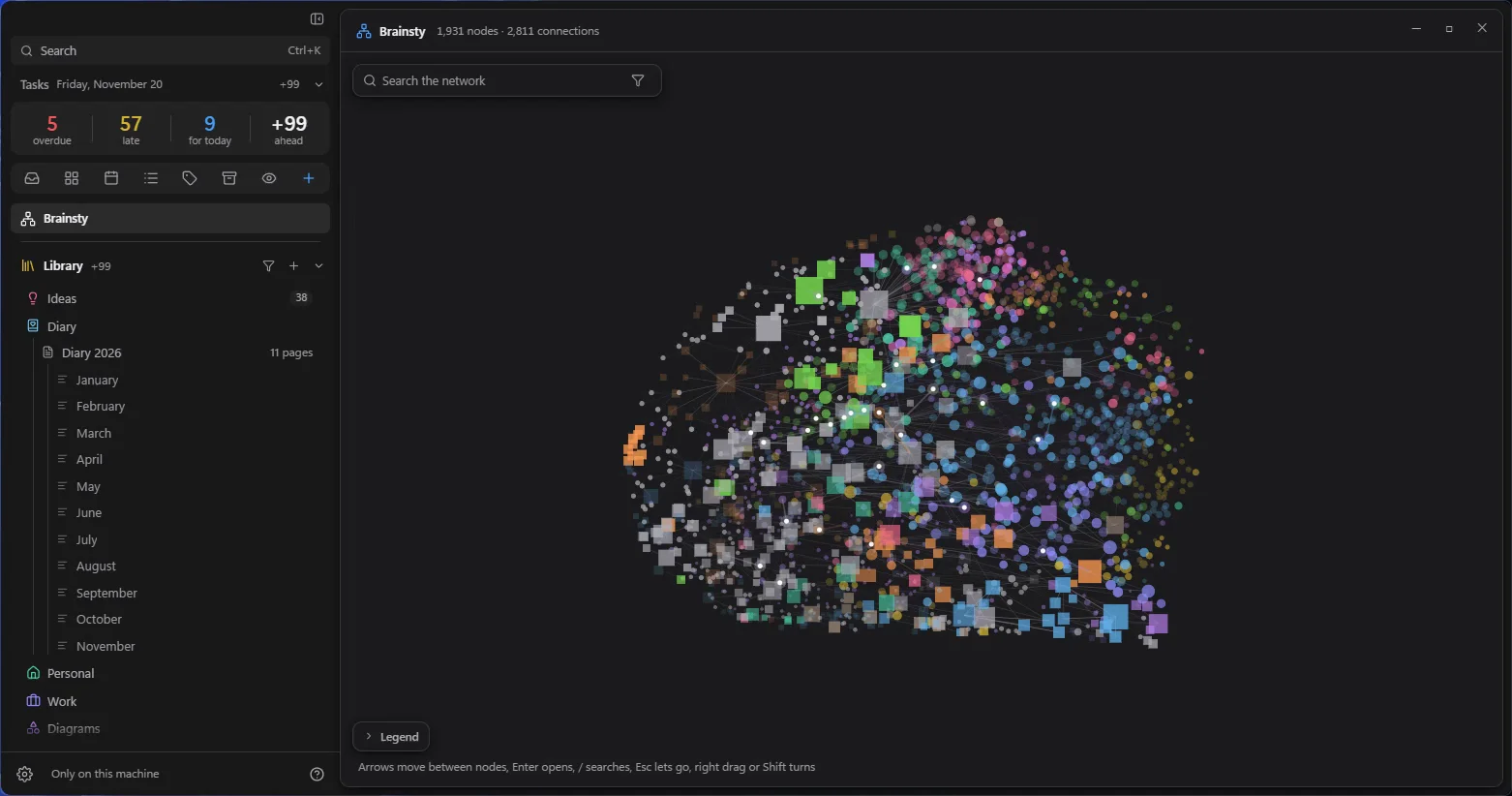
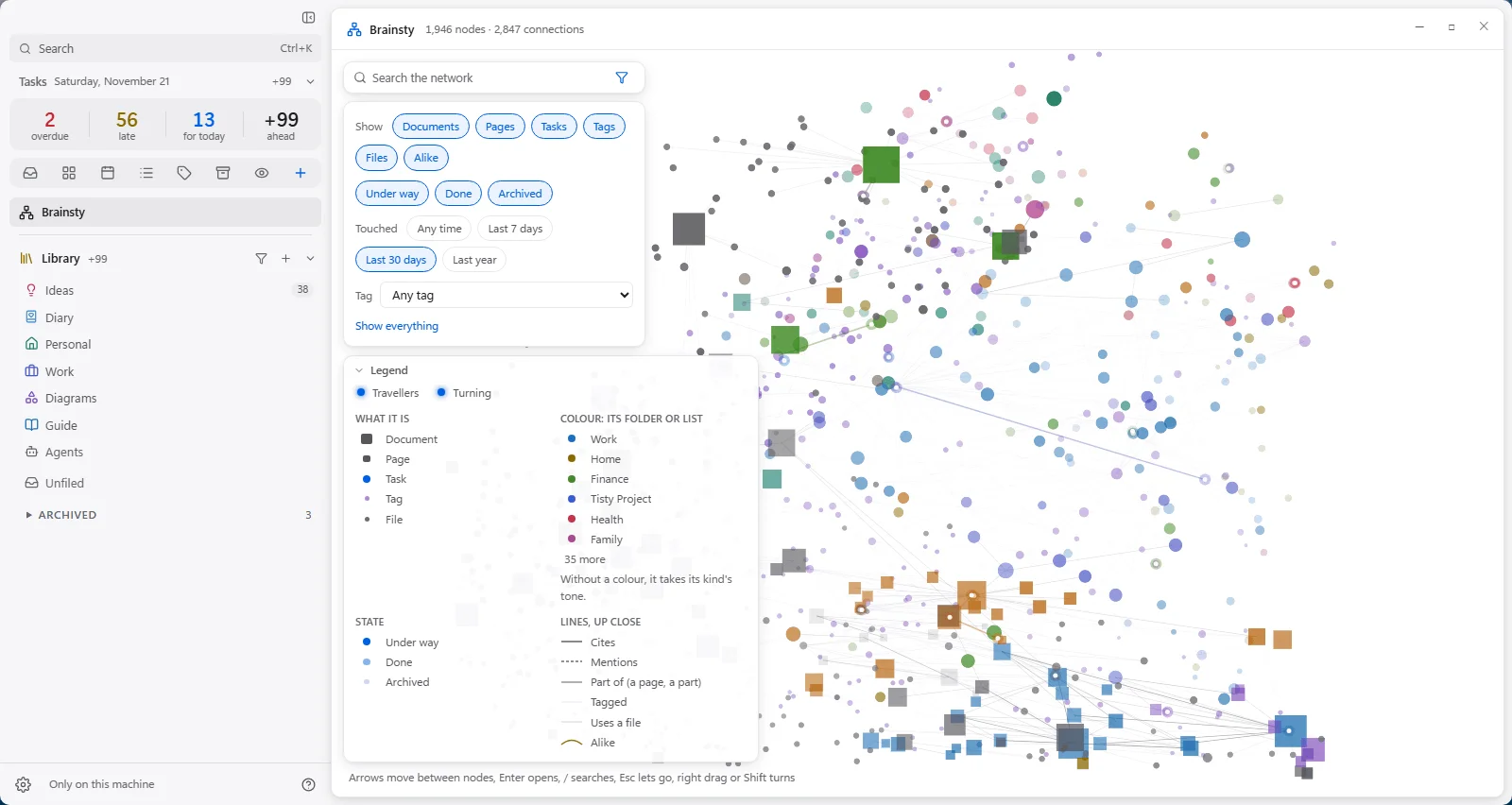
- It opens with the whole network in sight, turning like a globe (see The living network). The document or task you were on stays as the starting point for the arrows; if you were on none, what you wrote last. At the top, the count: «589 nodes · 1252 connections».
- The first time, the nodes settle for a few seconds, as if let go, and stop by themselves within four seconds; a network of about 5,600 nodes is still in two or three.
- The keyboard is its own as soon as it is drawn: the arrows,
/andEnterwork without clicking on the network first. - It fits the panel. When the panel changes width, for instance when you fold the sidebar, the network is drawn again to its size.
- To leave, pick another view in the sidebar, open something with Open or use
Escuntil it takes you back to where you were (see With the keyboard). Leaving stops everything the network ran: the drawing, the settling and its work in the background. Nothing is left spending. - Each time you come in, it starts afresh. It is read again, with what you wrote meanwhile, and starts with no node picked, no search and no filters. What each computer does remember: whether you left the legend open, its Travellers and Turning switches, and Show AGENTS.
- While you look at it, it does not rebuild itself. If something new arrives, like a step your agent ticks or a sync round, the network keeps the view, the layout and your switches; what is new shows the next time you come in. Only a change in your folders or lists (a new one, another name) draws it again, and a new colour shows at once.
- It follows Tisty, like any view: the light or dark theme and the language. In dark, the network takes the dark colours.
What each thing is
The table says how each kind looks from afar and at middle distance. Up close, each node becomes its icon: From afar and up close tells it.
| In the network | It is | How it looks |
|---|---|---|
| Square | a document or a page of a book | in its folder’s colour; a page, smaller beside its document |
| Circle | a task | in its list’s colour; under way, bright; done, fainter |
| Purple dot | a tag | tied to everything that carries it, faint |
| Grey dot | a picture or a file | tied to what uses it; up close, with its thumbnail |
Folders and lists are not nodes. They give their things their colour, tint their zone, have their place in the legend, and the card of each document or task says which one it is in, but there is no dot for «Pets» and no line to it: a folder ties nothing you did not tie yourself as you wrote. Tags are nodes, because #rina gathers things from different folders and lists.
Tags look faint on purpose: they say what something is about, not what you wrote. What leads in the network is what someone wrote, you or your agent (see What you wrote weighs more).
An archived document looks faint and small. A task never reaches that state in the network: while it is under way or done it is drawn, and one you hide or drop leaves it (see Good to know).
The documents in Agents, your agents’ rules, skills and memories, come hidden. They are not drawn, do not show in the search or the legend, and the travellers do not go through them, until you turn Show AGENTS on in the filters. Shown, they go smaller and in a faint coral, that folder’s own colour, with fainter lines too. That way they do not compete with what is yours: in a network with twenty Claude and Codex rules, what catches the eye is still what you wrote.
| Line | Ties | When it exists | How it looks |
|---|---|---|---|
| Solid | a citation | a card of another document or of a task, alone in its paragraph | the thickest and strongest |
| Dashed | a mention | a link inside a sentence to another document or to a task | strong |
| Solid, a little thinner | the structure | a page and its book, a part and its task, a task and the document it was born in, an idea and its document | strong |
| Thin, toward a file | a use | what shows a picture or attaches a file | faint |
| Thin | a tag | what carries #tag and its dot | fainter |
| Amber curve | an alike pair | two things that share uncommon words, a word with a typo or a translation, and that nobody tied | more opaque the more alike they are |
Every straight line is written somewhere, and can be explained. The amber curve is not: it is what Tisty thinks is alike, never straight, solid or dashed, so it is never mistaken for anything written, and the node’s card says why. Alike tells it.
What you wrote weighs more
A citation, a mention or a part was written by someone on purpose; a tag only says what something is about. So the network does not treat them the same:
- As it settles, a citation, a mention or a part pulls with strength 3; a line to a file, with 1.5, and a tag, with 0.3. Alike pairs do not pull: they move nobody.
- As it is drawn, citations, mentions and parts go thicker and stronger; files, fainter, and tags, faintest of all.
- The travellers prefer what was written too (see The living network).
For instance, Yisset cites the task «Rina’s yearly vaccine» on Rina’s sheet. The task lives in the Home list and the sheet in the Pets folder, but in the network they sit together, joined by a clearly visible solid line. Both carry #rina, and that tag barely draws them closer: what joins them is the citation.
The legend
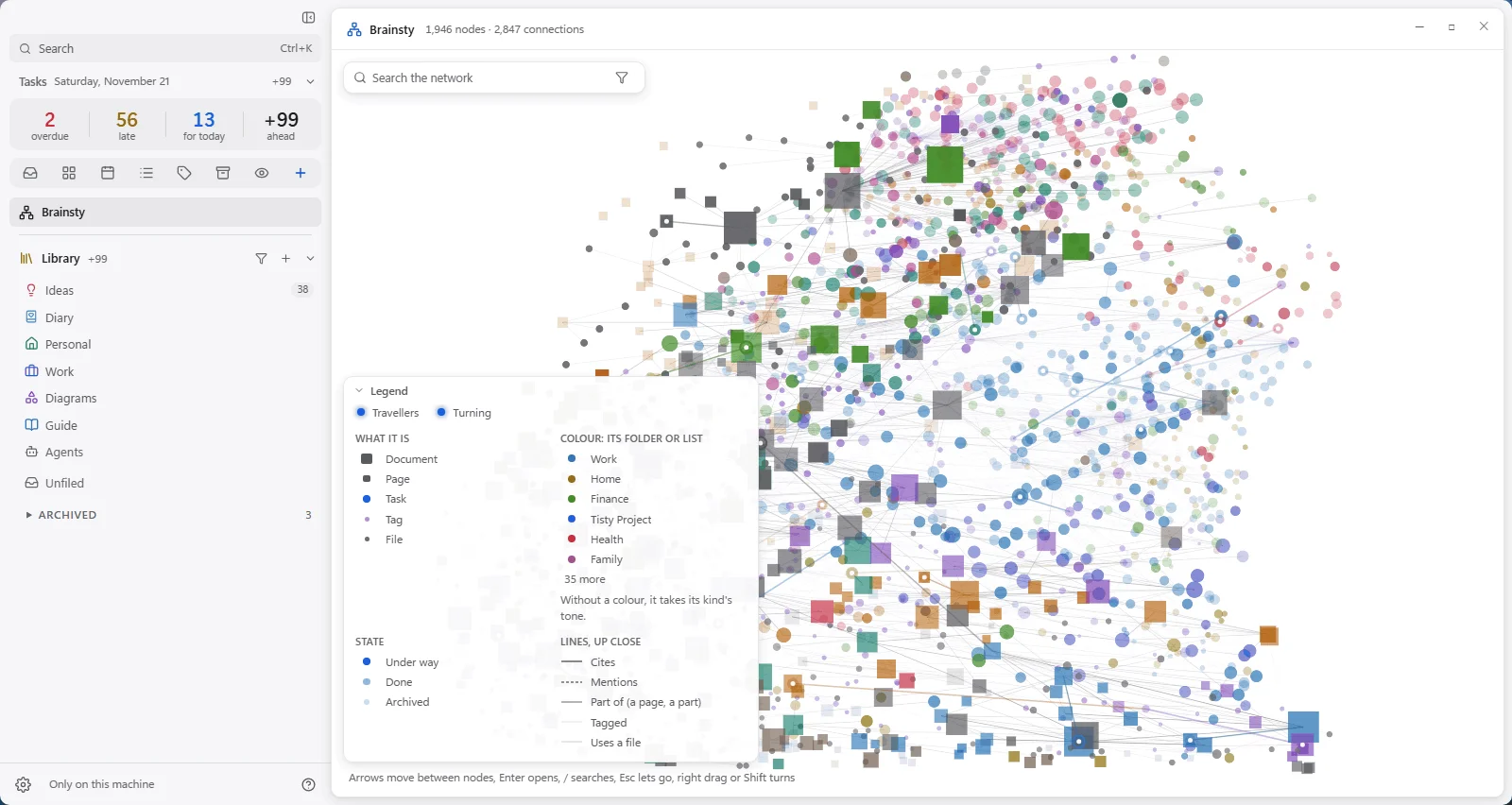
You do not need to learn these tables: Legend, at the bottom left of the network, says what each shape, each colour and each line of your network means. It comes folded, so it does not cover the network; a click on its title opens it and another folds it. Each computer remembers how you left it.
Open, it carries two switches at the top, Travellers and Turning, which The living network tells. Below, it has four parts. Each sample is drawn with the same brush as the network, so what you see in the legend is exactly what you see in the network, in the dark theme too:
| Part | What it shows |
|---|---|
| What it is | the shape and the tone of each kind there is in your network: Document, Page, Task, Tag and File. A kind you do not have does not show |
| Colour: its folder or list | the coloured folders and lists that have something in the network, the fullest first. It shows six; N more opens the rest and Fewer hides them again. With Show AGENTS on, AGENTS goes below, with its small square in faint coral; with the pointer on it, it says «The agents’ own files that Tisty keeps in step, small and quiet so they do not crowd yours». At the foot: «Without a colour, it takes its kind’s tone.» |
| State | how what is Under way, a Done task and an Archived document look |
| Lines, up close | Cites, Mentions, Part of (a page, a part), Tagged and Uses a file, only the ones in your network; and Alike, the amber curve, when Tisty thinks something is alike. With the pointer on Alike, it tells you what they are: «Amber curves: what Tisty thinks is alike, near up or around the node you pick. Nobody wrote them.» |
For instance, Marisol has eleven coloured folders and lists, and the Agents folder with her Claude rules. Her legend shows the six fullest, Home, Work, Pets, Trips, Shopping and Health, and below them 5 more. One day she wants to see where her rules ended up: she turns Show AGENTS on in the filters and the legend adds, apart, AGENTS; the Agents folder does not compete for a place among her colours. A folder with no colour, like Recipes, is not on the list: its documents show in the documents’ tone.
The living network
While you look at it, the network moves: it turns, and travellers walk its lines. It comes that way; if you would rather have it still, you turn that off from the legend.
- It turns like a globe, by itself, once a minute. What is behind looks smaller and fainter, and with the network turned the coloured zones hide and fewer titles show.
- Up close, it holds still. As soon as you bring the view closer, with the wheel, by picking a search result or by walking with the arrows, the globe stops turning, and it does not turn again until you see the whole network once more. That way the node you are looking at does not drift away. Zooming out past the whole network does not stop it.
- It also rests while the pointer is on the network’s shape and while you have a node picked. Over the empty space around it, it keeps turning.
- A double click on an empty spot takes you back to the whole network, and the globe turns again. A double click on a node, instead, opens it.
- You turn it yourself by dragging with the right button, or with
Shiftand the left one. A plain drag still moves the view, as always. - Travellers are dots of light that walk the connections on long trips: they leave a short trail and flash as they pass a tag or a node with many ties. They keep walking while the globe rests, and never go through what the filters hide nor through the Agents files while they are hidden. If no line is left to walk, none sets out.
- They prefer what was written. To choose their way on, they look at two things: where they go, documents and pages first, and along which line. A citation, a mention or a part weighs twice a line to a file and ten times a tag.
- How many travellers, and at what pace, depends on the size of the network: all its nodes count, the ones a filter hides too, the same the count at the top says. In a small network a few go quickly; in a big one, more go calmly, so you can follow them with your eyes:
| Nodes in the network | Travellers | They go from one node to the next every |
|---|---|---|
| under 60 | 4 | 3 seconds |
| 60 to 99 | 8 | 4 seconds |
| 100 to 149 | 10 | 5 seconds |
| 150 to 349 | 12 | 6 seconds |
| 350 or more | 14 | 7 seconds |
- Two switches, at the top of the open legend: Travellers and Turning, each with a dot that lights up. They come on, even if your system asks for reduced motion: the choice is yours. Without Turning, the network lies flat; with both off, it is a still network. Each computer remembers how you left them.
- It runs only while you see it. Moving to another view stops it, like the rest of the network.
- What it costs, if you are curious:
Ctrl/⌘+Shift+Mshows beside the legend how many milliseconds each frame takes and how many frames a second it draws, for instance «2.10 ms a frame · 60 frames a second». AnotherCtrl/⌘+Shift+Mhides it.
For instance, Lucas opens Brainsty with 180 nodes: he sees twelve travellers crossing the network as it turns, each going from one node to the next every six seconds. He rests the pointer on the Work zone to read a title and the globe stops; he moves it to the empty space and it turns again. He comes close with the wheel to «Budget 2027» and the globe holds still while he reads, even when he moves the pointer; the travellers keep passing. A double click on an empty spot and he is facing the whole network again, turning. To share his screen he prefers the network still: he opens the Legend and turns Travellers and Turning off, and next time on that computer it opens the same way.
From afar and up close
The network changes what it shows with the distance, and each detail fades in as you come closer:
- From afar, as it opens, with the whole network in sight, or with the wheel backwards: the nodes and their ties make the outline of a brain seen from the side, with no titles and faint lines. It shows where there is a lot and where there is little.
- At middle distance, as soon as you come a little closer: each folder and each list tints its zone, and only the most connected nodes carry a title.
- Up close: every title, each kind of line, tags as
#tagand beside each picture its thumbnail. And each node stops being a square or a circle to become its icon, in its folder or list colour and with its state: the plain shape fades as you come closer and the icon takes its place. The amber curves show here, little by little, between two nodes in view; around the node you pick they show from any distance.
| Node | Its icon, up close |
|---|---|
| Document | a sheet |
| Page of a book | a few lines of text |
| Task | a box; a done one, a tick |
| Tag | a # |
| Picture or file | a clip |
So, up close, the task «Rina’s yearly vaccine» is a box in the colour of the Home list, and «Buy Rina’s flea treatment», which you finished last week, a tick in the same colour. The icon dims with what is not picked, like the rest, and a click on it picks the node as before. From afar it costs nothing: there the plain shapes come back, drawn by the thousand.
The wheel zooms in and out; dragging moves you around, and dragging with the right button, or with Shift, turns the globe. At the first touch the network stops following the point it started on. A double click on an empty spot takes you back in one jump to the whole network, from any distance.
Picking, looking and opening
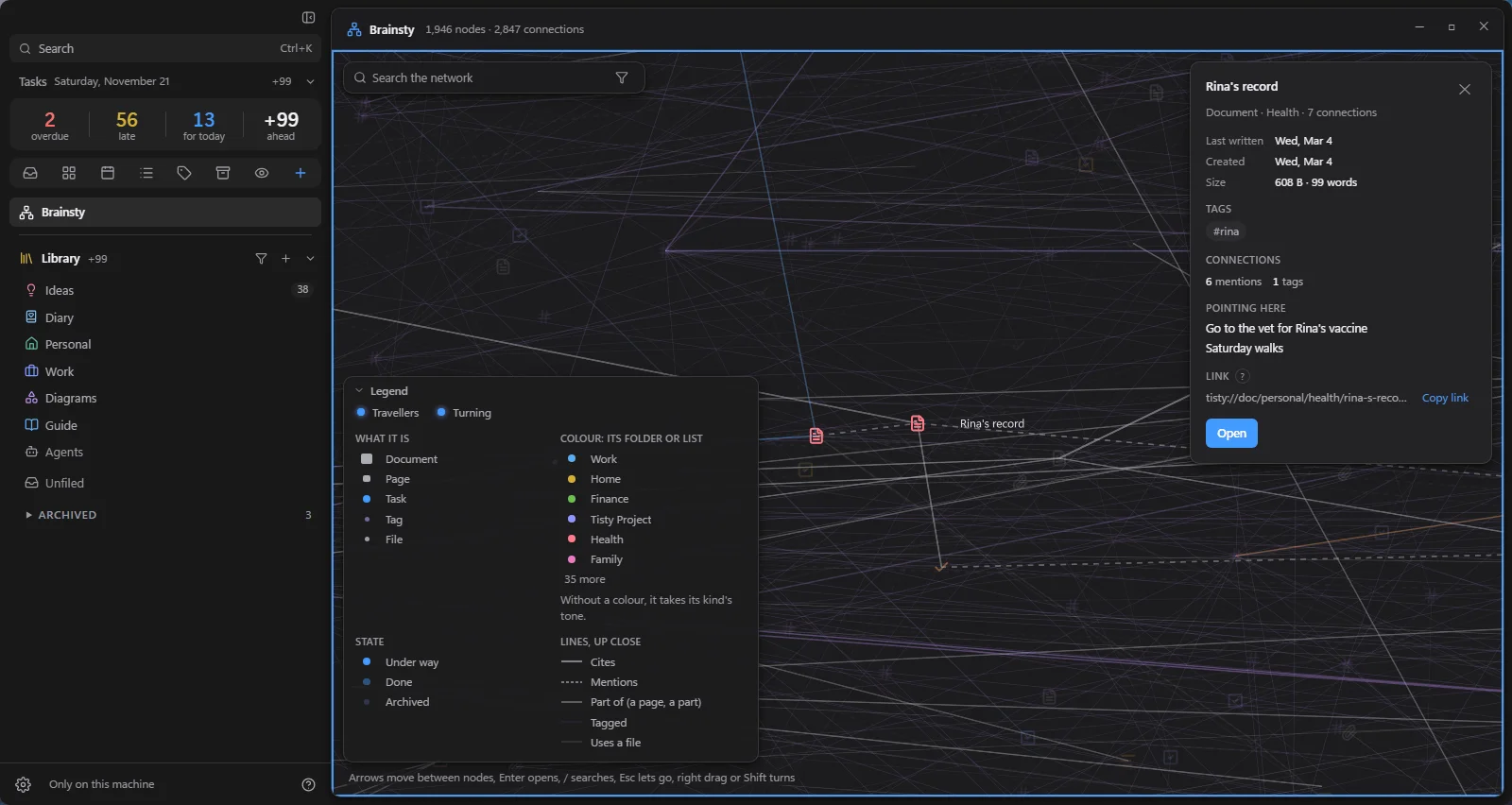
A click on a node lights it up with its neighbours, dims the rest and opens its card, on the right. The card does not show the document’s text: it shows its facts, so you know what it is, when it is from and what it joins before you open it. At the top go its title and a line with what it is, its folder or its list and how many connections it has: «Document · Pets · 6 connections».
Below come its facts, by what you picked:
| You pick | The card shows |
|---|---|
| A document | Last written, Created, Size, with its weight and how many words it has, and Language, like «EN» |
| A page of a book | the same, and first Page of, with its book’s title |
| A task | State, like «Under way · Due soon»; Day, Deadline, Part of, with its parent task, Parts, with how many it has, Steps, like «1 of 3 done», and Source, if it came with one |
| A tag | only the line at the top and its connections |
| A picture or a file | its thumbnail, if it is a picture, or the icon of its type; Type, Size and Modified, and Used in, with each document or task that uses it: a click on one picks it in the network. A file nothing in sight uses shows only its name |
A task’s state adds, after a dot, how its date is going: Ahead, For today, Late, Underway, Due soon or Overdue. A row with nothing to say does not show: a task with no deadline shows no Deadline.
Then, in this order, what there is:
- Tags, each like
#rina. - Connections, counted by kind: «2 cites 3 mentions». The kinds go in this order: cites, mentions, parts, tags and files, only the ones it has. Its folder or its list does not count as a connection: it goes on the line at the top.
- Pointing here: the documents and tasks that cite it or mention it, up to six, and «N more» when there are others. A click on one picks it in the network and opens its card; one that is not in the network, like what was left out past the node cap, is read but cannot be picked.
- Alike, in amber, when Tisty thinks something is alike: each with its title and its why, «Tisty thinks they are alike: they share quote and roof». A click on the title picks it in the network. Alike tells it.
- Link, on a document, a page or a task: its address and Copy link, which then says «Link copied». The ? beside the title, What is a link for?, explains it when you rest the pointer on it and keeps it written if you press it: «A link leads to this very thing. Paste it into a document to get here with a click, or give it to an agent so it reads this. It only works inside Tisty.» More in a document’s link. It is the same link you copy from a document’s panel, to paste in a chat, in your browser or hand to your agent. A document’s and a task’s look like this:
tisty://doc/pets/rina?id=…
tisty://task?id=…
At the foot, Open. The cross at the top, Close the preview, Esc or a click on an empty spot let go of the node: nothing stays dimmed, and the view stays where it was. To go back to the whole network, a double click on an empty spot.
- Open,
Enteror a double click on the node opens it in the same window, in the network’s place: a document in the Library, a task beside its list and a tag in its view. To come back to the network, another click on Brainsty; it opens whole again, and what you opened stays as the starting point for the arrows. - A picture or a file has no Link. Its Open opens it with your system’s program, outside Tisty, and Show in folder takes you to it in the file explorer. For instance, you pick the clip of «roof-quote.pdf»: its card says Type PDF, Size 240 kB, Modified on Tuesday, and under Used in, the task «Ask for the roof quote» and the document «House repairs».
Searching
The search box sits at the top left, Search the network; / focuses it from anywhere in the network. Type part of a title: accents and capitals do not matter. The list of what matches shows below, each with what it is («Document», «Task», «Tag»…): first what starts the same way, then what has a word that starts that way, and last the rest. Enter picks the first, or a click the one you want: the network centres on it and opens its card. When nothing is called that, it says «Nothing by that name».
Filtering
The funnel beside the search box, Filters, opens what can be left out. Each option is a button that turns on and off, and the network is drawn again with what remains:
- Show: Documents, Pages, Tasks, Tags, Files and Alike. Alike comes on; off, the network draws no amber curve and the card does not list them.
- Show AGENTS, on that same row, only if your network holds files from the Agents folder. It comes off: on, its documents show small and in a faint coral, come into the search and the legend names them AGENTS. Each computer remembers how you left it, and Show everything does not change it. With the pointer on it, it says «The agents’ own files that Tisty keeps in step, small and quiet so they do not crowd yours».
- The state: Under way, Done and Archived. It holds for tasks, documents and pages, not for tags or files: a document counts as under way until you archive it, so turning Under way off hides your open documents too, and Archived shows the ones you archived.
- Touched: Any time, Last 7 days, Last 30 days or Last year, by the last day each thing changed.
- Tag: pick one from the list and only what carries it remains; Any tag takes it off.
With any filter set, the funnel is tinted and Show everything appears, which brings the whole network back. Show AGENTS stands apart: it neither tints the funnel nor goes off with Show everything.
With the keyboard
| Key | What it does |
|---|---|
Tab | go round the search box, Filters, the card and the network |
| Arrows | pick a node and walk: first to a neighbour in that direction, otherwise to the nearest one; an amber curve is not a path. With no node picked, the first one sets out from the document or task you were on |
Enter | open the picked node, in the network’s place |
/ | search |
Esc | let go in layers: first the search, even when it is empty; then the node; and the last one takes you back to the view you were on |
Ctrl/⌘ + Shift + M | show or hide what each frame costs |
The line of keys at the foot of the network sums it up: «Arrows move between nodes, Enter opens, / searches, Esc lets go, right drag or Shift turns».
After you pick a search result, or leave the search with Esc, the arrows and Enter walk the network again, with no mouse. So /, rina, Enter and Enter again open Rina’s document without leaving the keyboard.
An Esc you type in a field of the sidebar, like its search box, belongs to that field: it lets go of nothing in the network and does not take you out of it.
An example: back to Rina’s things
You have not touched anything about Rina for a month and want to know how it is going. You are on the building minutes.
- Brainsty in the sidebar. The network opens in the panel, in place of the minutes, whole and turning, with its travellers.
/,rina,Enter. The network comes close and centres on «Rina», the document in the Pets folder, and the globe holds still while you look at it up close. It opens her card: «Document · Pets · 6 connections», last written a month ago, in English. Pets goes on that line at the top and does not count among the six.- You come a little closer with the wheel: each neighbour becomes its icon, with its title. The sheet of «Vet», joined by a dashed line (you mention it in a sentence); the box of «Rina’s yearly vaccine», in the colour of the Home list, joined by the solid, strong line of its card; the clip of the photo of the walk, with its thumbnail; the
#of therinatag, faint, and an amber curve to «Saturday walks», which nobody linked. Rina’s card says why, under Alike: «Tisty thinks they are alike: they share rina and park». - A click on «Rina’s yearly vaccine»: its card says «Under way · Due soon», Deadline on Friday and Steps «1 of 3 done», and under Pointing here is «Rina», which cites it. Copy link gives you its link to pass on to Yisset, who is taking her.
- You want to see what else there is before going on: a double click on an empty spot and you are back at the whole network, turning.
/,vaccine,Entertakes you back to the task. Open: the task opens beside its list, in the network’s place, and there you tick «Book a slot». - Another click on Brainsty: the network opens whole again; the task stays as the starting point for the arrows. Filters, Tag
rinaand Touched Last 30 days: her two documents and the tasks under way that moved this month remain. Escuntil you are back: first it lets go of what you picked and the last one takes you back to the task. Filters are not kept: next time the network starts whole. Only Show AGENTS stays as you left it.
Alike
Two things can be about the same without anyone having tied them: the task «Ask for a quote on the roof» and the document «House repairs», which talks about the roof and its quote. Brainsty notes them as alike, apart from the lines you wrote.
Tisty looks for things alike with three clues, in this order. Each clue only fills the places the one before left free, up to three alike for each thing, and each alike pair keeps what says why.
Shared words
Two things are alike when they share at least two weighty words: the kind that shows up in few of the things you keep, in 5 % of them or fewer. Quote and roof weigh; week or make, which are everywhere, do not. Words are compared without accents or capitals, so Roof and roof are the same.
It works across languages too when what they share are names: a task in English and a document in Spanish that both talk about Folio and Glama are alike.
A typo
You type fast and jot «La imrpesora nueva no imprime en color» (the new printer prints no colour). A week later, Jaime asks you to «Instalar la impresora nueva». They share only nueva, but imrpesora is one change away from impresora, and Tisty ties them: «Tisty thinks they are alike: they share impresora ≈ imrpesora and nueva». It works the same in English, for a word of six letters or more.
- One change is a letter too many, one too few, a different one or two neighbouring letters that swapped places, like rp for pr.
- Only words of six letters or more. Cast and cost are two words, not a mistake.
- Never words with digits. chapter1 and chapter2 were written apart on purpose.
- Of the two spellings, the one you use more in what you keep is the one that counts as right.
A translation
You jot «Pagar la cuenta del agua» and, another day, your agent jots in English «Pay the water bill». They are about the same thing and share not one word. Tisty ties them with a Spanish–English dictionary: «Tisty thinks they are alike: they share pagar ≈ pay and agua ≈ water». The same goes for «Arreglar la gotera del techo» and «Fix the roof leak»: gotera ≈ leak and techo ≈ roof.
- It is not AI. It is a fixed list of 41,140 pairs of words, made by linguists: it comes from the Open Multilingual Wordnet 2.0, with the Multilingual Central Repository 3.0 for Spanish and Princeton WordNet 3.0 for English. It is a file of about 760 KB (777,917 bytes) that comes inside the installer; compressed there, it adds about 0.3 MB to the download. It is never looked up online. See No AI.
- One pair per word, the one of its most used sense. So sometimes it is not the one you expect: cuenta gives tally, not bill. In the example above, what ties them is pagar and agua.
- A word written the same in both languages, like hotel, is not on the list: it already ties as a shared word.
- It only ties two different languages: never two things in Spanish nor two in English, even when they say the same with other words.
- The language of each thing is the one the document declares, if it says. If not, Tisty works it out from words like «el», «la», «de» or «the», «of», «to», and from accents and the ñ. A thing in English is never read as Spanish.
- When it cannot tell, it does not tie it by dictionary. A task that only says «Router», or «Rina’s yearly vaccine», carries none of those words. Shared words and typos still tie it.
- Only the app reads the dictionary, in its low-priority pass. Your agent’s gate does not load it: your agent sees on the card the alike pairs the app already kept.
What holds for all three
A typo or a translation counts like a shared word: two things are alike only when they share at least two weighty words, and at least one of them written differently on each side. In a translation, a word each side wrote differently, like tarjeta and card, counts even when it shows up in as much as 25 % of what you keep, not only 5 %.
- Three alike at most for each thing, and each end must be among the other’s three closest.
- The bar comes from what you keep, not from a fixed figure: an alike pair must beat what one pair in a thousand reaches in your base.
- What is already tied is not marked alike: when a line in the network already ties them (a citation, a mention, a part and its task, the document a task was born in), or when they are a page and its book, a document and its version in another language, or a task and its page.
- A document in another language has a place of its own among the three, so what it shares with another language is not crowded out by kin in its own.
- Each thing keeps up to 256 words, the ones said most, and only from its prose: what the page shows as text. Code, in a block or inline, does not count, nor HTML, properties, link addresses, paths, file names, tags, icons, bare numbers or long strings of letters and digits, like an id or a hash. Nor do the words that only say how a text is built, like bold, italic, table or link, in English or Spanish. Before, two documents with the same piece of HTML were tied by span and div; now only what they say ties them.
- Of a task, what counts is its title, its description, its steps and its page. Its progress notes do not: they tell how it went, often in the same few words for any task, like «I said I would call on Monday», and they tied tasks that had nothing to do with each other.
When. A low-priority pass, in the background, looks every 30 seconds and waits for you to stop writing, five minutes at most, before comparing. The words of what changed are kept at once. When a new version of Tisty changes Brainsty’s base, the base is built again once, on the first start: meanwhile the network says «Brainsty is still reading what you keep. Open it again in a moment.».
What never goes through it. Hidden and dropped tasks, your whole Diary, even when you open it to agents, and the documents in the Agents folder keep no words: they are never alike to anything. The notice Tisty puts over something that reads like a credential does not count either. Hiding or dropping a task takes its alike pairs away in the same round.
Where they show:
- In the network, as an amber curve: up close between two nodes in view, and around the node you pick from any distance. How opaque it is is measured among the alike pairs in your base: the most opaque is the most alike.
- On the card, in its Alike section, apart from the connections. They show as the base keeps them, without accents and in lower case. A shared word goes alone, quote; a typo or a translation, as a pair, impresora ≈ imrpesora or pagar ≈ pay. The order of the pair is the one the base kept, the same from both cards.
- On the card your agent reads, under
guessed, apart from everything someone wrote. Each alike pair brings its title, its state, its score, what they share andmethod, which says how they were tied:words,typoordictionary. The sentence beside it says so in words: «shares» for shared words, «spelled almost the same:» for a typo or a plural, likevacuna≈vacunas, and «alike by translation:» for the dictionary. The rules ask it to read both before joining anything. A pair comes asa≈b, with no spaces, and is never a word both of them wrote the same:
> brain {"task": "…Ask for the roof quote…"}
{ "guessed": [
    { "id": "…", "kind": "doc", "title": "House repairs", "state": "open", "score": 0.42, "shared": ["quote", "roof"], "method": "words" } ] }
"Guessed alike by Tisty, linked by no one: \"House repairs\" […] (open) (shares quote, roof)."

> brain {"task": "…La imrpesora nueva no imprime en color…"}
{ "guessed": [
    { "id": "…", "kind": "task", "title": "Instalar la impresora nueva", "state": "open", "score": 0.55, "shared": ["impresora≈imrpesora", "nueva"], "method": "typo" } ] }
"Guessed alike by Tisty, linked by no one: \"Instalar la impresora nueva\" […] (open) (spelled almost the same: impresora≈imrpesora, nueva)."

> brain {"task": "…Pay the water bill…"}
{ "guessed": [
    { "id": "…", "kind": "task", "title": "Pagar la cuenta del agua", "state": "open", "score": 0.61, "shared": ["pagar≈pay", "agua≈water"], "method": "dictionary" } ] }
"Guessed alike by Tisty, linked by no one: \"Pagar la cuenta del agua\" […] (open) (alike by translation: pagar≈pay, agua≈water)."
An alike pair shows only when both its ends are in sight: in the network, both must be drawn; for an agent, both must pass its gate, so a hidden or dropped task is never named through an alike pair. An alike pair adds no connection to the count at the top and does not count towards the 12,000-node cap. And read, which brings the text, brings no alike pairs: they go only on brain’s card.
Good to know
- It builds itself, on this computer. Tisty reads how your things are tied in the background, without slowing what you do. A link you just wrote reaches the base a few seconds later.
- The network is read when you come in. What you wrote in another view is there the next time you come into Brainsty. A new alike pair takes a little longer: it waits for the low-priority pass.
- Just installed, while it reads everything for the first time, the network says «Brainsty is still reading what you keep. Open it again in a moment.». With nothing kept: «Nothing to draw yet: write a document or a task and it shows up here.».
- Up to 12,000 nodes and 40,000 connections. Past that, the network keeps what you touched last, its neighbours, your documents and the tasks under way, and says at the top how much was left out: «312 nodes and 940 connections left out». Past 6,000 nodes, nodes shrink so the whole network takes the same room in the panel.
- What you put away does not show. A task you hid or dropped is not drawn, neither as a node nor as the end of a line, and a tag or a file only it carried goes with it. Nor are the pages hung under it, nor your Diary with its pages, even when you open it to agents. Nothing points at them: not an alike pair, a traveller or Pointing here, and the network does not start from one of them even when it is what you touched last. What is archived is there: Archived shows the documents you archived. For instance, Jaime drops «Change internet provider» with Not doing it: the next time he comes into Brainsty, the task, its page of notes and the amber curve that tied it to «Router» are gone. The same holds for your agent: where you linked one of those tasks it reads «a task out of sight» (see How an agent works).
- Nothing leaves the computer. The network and the alike pairs are worked out on each computer and rebuild themselves: they are not synced, and they do not go to Folio, a
.tistyx, an export or a backup. What travels is your documents and tasks, and each computer draws it again. See Privacy. - Without a dedicated graphics card the network is drawn just the same; zooming in and out costs a little more.
Where next
- Linking documents: the dashed and solid lines between documents.
- Tasks in documents: the lines between a document and its tasks.
- How an agent works: the same network, read by your agent.
- Documents: folders and tags, which give the colours and the zones; a document’s link, the one you copy from the card, and its earlier versions.
- The Agents folder: your agents’ files, hidden in the network until Show AGENTS.
- Privacy: why alike pairs are not AI, and what Brainsty keeps on this computer.