Assistants (MCP)
Assistants and MCP
Tisty is the memory your AI agent keeps between sessions. GitHub Copilot, Claude Code, Codex, Cursor or any assistant that speaks MCP files its work here…
Tisty is the memory your AI agent keeps between sessions. GitHub Copilot, Claude Code, Codex, Cursor or any assistant that speaks MCP files its work here as tasks with steps and a journal, keeps what it learns in documents, and starts the next session from what moved instead of from a blank chat — on this computer, with no account and nothing over the network.
Tisty itself is not AI and has none inside. The natural language that turns «call the bank at 3» into a task is rules running on your machine: no model, no request, no cloud. That is not going to change.
But if you already use an assistant, you are probably telling it things worth keeping — the school group says card stock on Monday, the invoice is due on the 30th, the bug you just fixed and how. So Tisty leaves a door, and you decide whether to use it.
Your agents’ work, in the open. Through Tisty, an agent plans in documents and works in tasks: it writes the plan, what it found and what it decided as Markdown, breaks the work into tasks with steps and ticks them off as it goes. Nothing stays buried in a chat: every stage lands in Tisty, on your computer, where you can follow it as it happens and audit it later. When it says a task is done, you are the one who closes it.
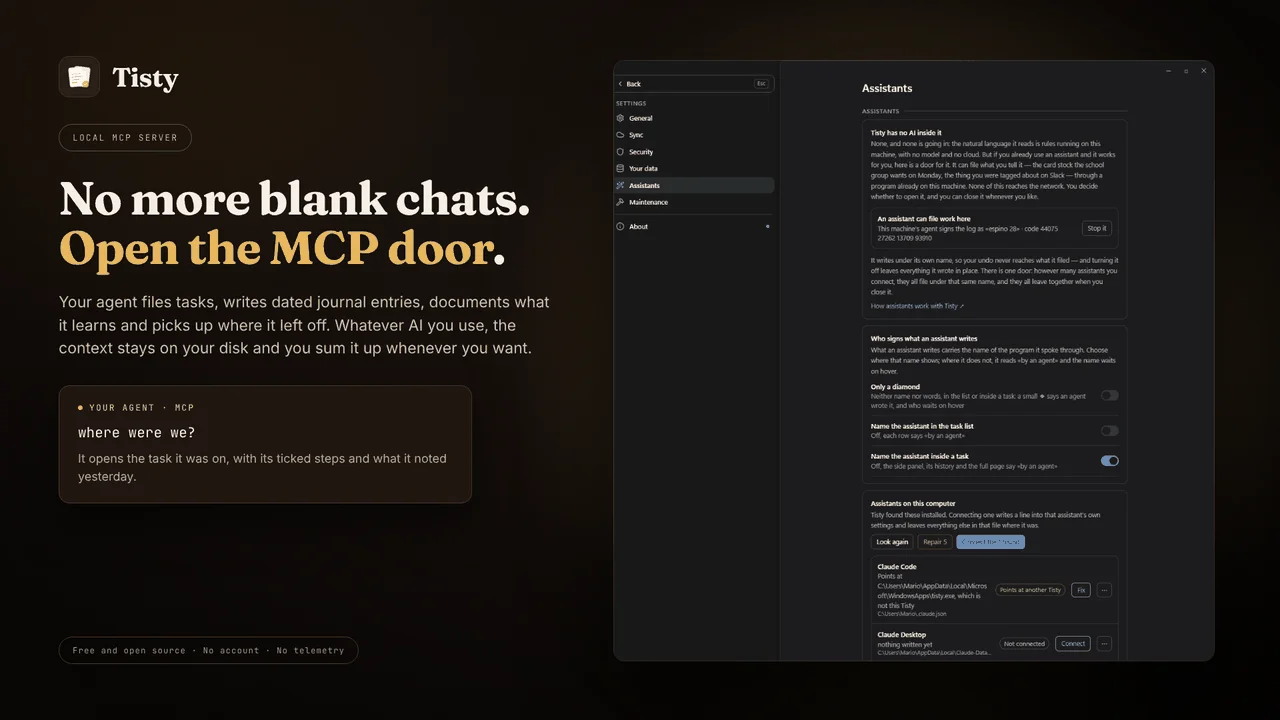
How the door works
Tisty speaks MCP through tisty mcp, over its own standard input and output. That tisty comes inside the app and is not a command line any more: it opens only the assistant’s door (see Command line).
- On this machine only. No port, no account, no token. It is not a server, and nothing can reach it from the network.
- Nothing listens until you connect it. The assistant starts
tisty mcpwhen it needs it. - You hold the door. It comes open on its own until you choose — on a new install, and on an update if you never closed it — and in Settings › Assistants › Door you close it with Stop it, which first tells you what happens: «No assistant will be able to file in Tisty.», what it wrote stays where it is and connected assistants stay connected. While it is closed, everything an assistant tries is refused, and Connected reminds you: «Even so, they file nothing until you open the door.», with Go to Door. Letting an assistant in and throwing it out are events in your log; that you chose to keep the door closed is kept in this computer’s settings.
Since 1.32.1 a stable Tisty also answers to plain tisty from any terminal, so a plugin can start it by name. The Microsoft Store and Homebrew put that name there themselves; the installer’s copy on Windows adds its own folder to your PATH while the door is open and takes it off again when you close it. If you have the Microsoft Store copy and the installer’s at once, the newest answers. An assistant that was already open needs a restart to notice.
Connecting an assistant
From Settings (the easy way)
Settings › Assistants › Connected finds the assistants installed on this computer among the ones Tisty knows (Claude Code, Claude Desktop, Codex, GitHub Copilot CLI, Visual Studio Code, Cursor, Devin Desktop, Windsurf, Antigravity, Gemini CLI, Qwen Code, OpenCode, Kilo Code, Zed, Junie, Kiro, Warp, LM Studio, Amp, Augment, Factory Droid, Trae, Cline, Roo Code, BoltAI, Goose and Continue) and says how each one stands:
- Connected — it starts this Tisty.
- Not connected — Connect writes Tisty into its settings, in the shape that assistant reads.
- Points at another Tisty — an older copy, or one that moved. Fix points it here.
- May be here — only its folder is left, so it may have been uninstalled.
- By hand — Goose and Continue keep their settings in YAML, which Tisty does not write. The row shows what to paste.
Connect the 3 found, with however many wait, connects every one of them at once. Some files serve more than one assistant: GitHub Copilot CLI’s is also read by VS Code, and Codex’s by ChatGPT and Warp.
An assistant reads its settings when it starts, so after connecting it, quit it completely and open it again. If it has a window, closing it is not enough: on Windows it keeps running by the clock until you quit it from there, and on a Mac until ⌘Q.
Tisty only touches its own entry. Anything you added to it, like env or the tools you allowed, stays, and so does the rest of the file. The first version of each file is kept beside it as .before-tisty, and the one just before each write as .before-tisty-last.
Hooks. Claude Code, Cursor, Gemini CLI and GitHub Copilot (its command line and the Copilot sessions in VS Code) also run hooks: commands they call when a session starts, after a tool runs and when a turn ends. On a connected one, Add under its row first tells you which file it will write and, once you agree, puts Tisty’s hooks there: ~/.claude/settings.json, ~/.cursor/hooks.json, ~/.gemini/settings.json, or a file of their own, ~/.copilot/hooks/tisty.json. Remove takes out only Tisty’s. Cursor also runs the hooks in Claude Code’s settings, and Tisty hands a turn back only once even when both fire. Gemini CLI runs them only in folders you trusted. What they do is under A day with your agent.
The ⋯ on every row shows how to connect that assistant by hand: its own command when it has one, and the exact lines for its file. The search box below the list does the same for an assistant Tisty knows but did not find.
With a plugin
Some assistants take Tisty as a plugin. The plugin carries a small launcher that finds the Tisty installed on this computer (the Microsoft Store copy, the installer’s, the Mac app or Homebrew), uses the newest when there are several, and starts that copy’s own tisty mcp, so what the assistant writes always matches your app and your data. If Tisty is not installed, the assistant gets a single tool, install_tisty, that tells you how to get it. The launcher needs Node.js.
In Claude Code:
/plugin install tisty --marketplace rgdevment/mcp-pluginsAny other assistant that starts a server by command, such as Cursor, Cline or Claude Desktop, takes the same launcher from npm:
{
  "mcpServers": {
    "tisty": { "command": "npx", "args": ["-y", "tisty-mcp"] }
  }
}
VS Code reads the same entry under servers instead of mcpServers.
The first start downloads the launcher and can take a moment; later ones are immediate. If Tisty lives somewhere unusual, set TISTY_PATH to the full path of its tisty.
From version 1.4.0 the plugin also brings Tisty’s hooks to Claude Code, and the Gemini CLI extension brings them to Gemini CLI.
Connect each assistant one way, the plugin or Settings › Assistants, not both: otherwise it runs Tisty’s server twice and sees every tool twice. The plugin’s source and its issues are in mcp-plugins.
Tisty is also listed where assistants look for servers: the official MCP Registry as io.github.rgdevment/tisty, the GitHub MCP Registry, npm, Glama and MCP Market.
Assistants inside WSL
On Windows, an assistant that runs in a Linux distro under WSL reads its settings in Linux, where a C:\... path does not exist. Settings › Assistants › Connected lists your distros; Look in Ubuntu reads that distro’s files (starting it if it was stopped) and connects its assistants to the same Tisty, through its Linux path:
$ claude mcp add --scope user tisty -- /mnt/c/Users/<you>/AppData/Local/Programs/Tisty/tisty.exe mcpIt is the same Tisty and the same tasks and documents as on Windows. If a distro has Windows programs turned off ([interop] enabled = false in /etc/wsl.conf), Tisty says so and writes nothing there.
By hand
For an assistant Tisty does not know, one line does it, with the full path to the tisty that came with the app. Settings › Assistants › Connected › How to connect one shows both forms below with that path already filled in for this computer, ready to copy, so nothing needs to be on your PATH:
$ <your-assistant> mcp add tisty -- <path-to-tisty> mcpFor example, with Claude Code:
$ claude mcp add --scope user tisty -- <path-to-tisty> mcpClients configured with a JSON file take the usual shape:
{
  "mcpServers": {
    "tisty": { "command": "<path-to-tisty>", "args": ["mcp"] }
  }
}
Restart the assistant. If you closed the door, open it again in Settings › Assistants › Door.
You do not have to remember this step. When an assistant tries to work with Tisty while the door is closed, the window tells you — «Claude Code tried to come in» — and Let it in opens the door right there. It also tells you when your assistants are connected but cannot do anything yet because the door is closed.
What it can do, in short
File a task with its steps and its date, set a reminder, add to a task’s journal, write and edit documents, file them into folders and pages, keep a copy of a file you point it at, jot ideas in Ideas and sort them out with you, search and read what is there — and say a task is done, yours too, for you to confirm.
When it tells you what it did, it names a task or a document the way you would: by its title and where it is — the list, or the folder. It never shows you an id.
It can never close or delete a task, delete a document, or move a day you set. A document that had its day it marks: you delete it, put it away or take the mark off. An idea leaves Ideas only when it files the idea in a document or turns it into a task, as you would; an old one it marks the same way. Your Diary is out of its sight until you open it from the Diary itself, and even then it only adds to the end of today, signed, when you ask. On a task you wrote it works as in a document — the description, the page, the open steps, the title and the list — and a step or the whole task done is only its word, which you take or not.
The full rules are in What an assistant may do, and every tool is in the tools reference. The rules, skills and memory each assistant reads, even one you never connect, you keep in the Agents folder.
Ready-made requests and @-mentions
The memory Tisty keeps for your agent is one command or one @ away, with no tool names to learn.
Eight ready-made requests. Tisty hands your assistant eight requests it shows as commands. In Claude Code they are in the / menu, and /mcp__tisty__pick_up and the like run them; other assistants that take requests from a server show them in their own menu.
- Pick up where I left off (
pick_up) — what moved since the agent was last here and who moved it, then the open task it last worked on, with its steps, its page and its latest notes. It changes nothing. - Leave this where I can pick it up (
leave_off) — in one call it ticks the finished steps and leaves the task’s state: what is done, what is left and comes next, the decisions in force and what was ruled out. It notes only what changes something, with its why; if everything is done, it says so with the proof, and a decision that outlasts the task goes in its document, dated, with the one it replaces struck through; with no document on it, it stays in the state and it tells you. - Plan this work as a task with steps (
plan_task) — one task with its steps, in the list it belongs in, once nothing open or in the archive already covers it. - How did we solve this before? (
solved_before) — it searches the archive of finished tasks and your documents before trying anything new. - Keep this decision in its document (
keep_decision) — the decision you just made goes into the one document on its subject, in place, and the one it replaces is crossed out; if no document covers it, it asks you where it belongs. - Brainstorm ideas with me (
brainstorm) — it offers short ideas on a subject, numbered, says which are already in Ideas or already a task or a document, and jots in Ideas only the ones you keep. - Sort out my Ideas (
sort_ideas) — it reads the ideas waiting and tells you which belong together, which would be a task and in which list, which go into which document and which are old. It changes nothing until you say, and then does only that. - Go over what Tisty keeps and propose fixes (
consolidate) — Tisty’s «dreaming», a pass that runs only when you ask for it. It looks for agent summaries left stale because their document changed, links that lead nowhere, documents doubled or out of order, and tasks whose state fell behind. It shows you what it found, numbered, with the fix it would make, and changes only what you approve. It never deletes: what is old is marked, for you to delete in one click, keep or unmark. With a word after it, like/mcp__tisty__consolidate Kitchen, it goes over only that folder, list or subject.
Each one takes a word after it, like /mcp__tisty__solved_before timeouts, or nothing, and then it works from what you have been talking about.
A consolidate pass, start to finish. Mario types /mcp__tisty__consolidate Kitchen. The assistant first reads the tidying rules (rules with topic: "tidying") and what moved (catch_up), then looks at the folder without changing anything:
brainwith{ "folder": "Kitchen" }brings each document with the summary an agent left; one written before the document last changed comes with"stale": true.brainwith{ "doc": … }brings each document’s card:deadnames the links that lead nowhere, andalike,repeatedandmislabeledwhat is doubled or misnamed.- On a task’s card,
brainwith{ "task": … },state_oldsays the state was written before its steps changed or a decision came.
And it answers, for example:
- “Weekly recipes” (Kitchen): the agent’s summary is older than the last change. I would read it again and leave one saying “Monday to Friday menu, with the shopping list at the end”.
- “Weekly recipes”: the link to “Rice and beans” leads nowhere; that recipe now lives in “Rice dishes” (Kitchen). I would point it there.
- “Shopping list (copy)” (Kitchen): says the same as “Shopping list”. I would mark it as a copy of that one.
Which ones shall I do?
Mario answers “1 and 2”. The assistant does only that (sum_up and edit_doc) and ends by saying what changed, what is waiting and how to undo it. The copy in point 3 stays as it was. Had Mario said yes, the copy would have been marked (flag_doc), not deleted: you delete it in one click, keep it or unmark it. A document you wrote is asked about on its own, and in the Agents folder the assistant only tells you what it would change.
Documents to mention. Your documents that are not put away are offered too — your Diary only while it is open to agents — so you can hand one to the assistant by name: in Claude Code, type @ and pick it by its title and folder. A document of up to about 12,000 characters arrives whole; a longer one arrives as its outline, its headings and their lines, and the assistant asks for the part it needs.
A day with your agent
A real session, call by call and with an excerpt of each answer, is in How an agent works.
What an agent connected to Tisty does on a real piece of work:
- It asks what moved since its last session, and who moved it, instead of rereading everything. The same answer names the tasks that press, overdue first, so one that comes back every month reaches it on its day.
- It opens the task it was on, which Tisty names for it. Its state comes first, with the notes written after it; Done when on its page says when it is finished, and the unticked steps say what is left.
- It searches the archive before proposing anything. If it was solved before, it starts from there.
- It reads the module’s document by its outline, then only the section it needs, and keeps to the decisions and to what is out of scope — so it does not reopen settled debates or wander off.
- It ticks each step when it is done and leaves the task’s state in the same call, a «State» section on the task’s page that you read too and that it writes whole each time. The journal keeps what changes something — a decision, something ruled out, a block — so the next session, or another agent, does not repeat the failed attempt. When a note undoes an earlier one, the old one stays in the history, marked as replaced, and stops coming first. When steps move or notes arrive after the state, Tisty says the state is old.
- When a task’s page grows long, it compacts the assistants’ notes on it into one dated digest of what still holds. The journal stays whole, and asking it to put the notes back brings them as they were, even after later ticks.
- It ends by saying what it did and how it knows it holds. You review it and close it.
- After reading a long document, it leaves a summary for the next agent to choose by. When the document changes, the summary is marked stale.
If it forgets, Tisty asks. When the agent keeps calling Tisty while the task it opened goes ten minutes without a word from it, or while it writes three other things, the next answer asks it once whether that task is up to date. It names the task and what is missing — the steps still unticked, or that every step is ticked and the task is not said done — and asks it to leave it in one call: the steps it finished and the task’s state, or, if the work is done, to say so with the proof. It never asks for a note of progress, and it asks again only after the agent writes on that task. It reaches every assistant, though only when the assistant calls Tisty. You turn it off in Settings › Assistants › Door, with Ask it to keep its task up to date.
With Tisty’s hooks, it also asks when a turn ends. In the assistants you gave them, a session starts with the last three open tasks your agents wrote on this computer, newest first, with how many steps are ticked and the next one, what moved since and what is pressing, in about 2,000 characters, so the agent does not have to remember to ask. After each edit and each call to Tisty, the hook leaves a mark for that session, without reading the conversation. While you let an assistant file here, when a turn edited files and wrote nothing in Tisty, it hands the turn back once: if that was work on a task, tick what was finished and, if it is done, say so with the proof. If the agent lets it pass, it stays quiet until the agent calls Tisty again, so work outside any task costs one extra turn at most; in GitHub Copilot that turn can spend a premium request. Work that edits no file, like planning or research, it does not see: there only the question in the answers reaches the agent. Codex and Claude Desktop have no hooks. Remind it when a turn starts and ends, in Settings › Assistants › Door, turns the hooks off without taking them out.
What it names, Tisty links. When the agent names a task or a document in what it writes — a note, a description, a document — by its id, or by its exact title between quotes, Tisty turns it into a link as it lands, the same link you make with [[ or a task’s card, and tells the agent what it linked. What it is not sure of, like a title two things share, it leaves as written and hands back to the agent to judge. A name in double brackets stays the chip it was written as. It never touches headings, tables or lines that were already there, and a task you put out of sight is never named. A picture written or attached without saying what it shows — its file name does not count — gets a question in the answer, since the words in its brackets are all an agent or a screen reader will know of it. And in a section of decisions, one struck through reads as replaced: the card an agent reads puts the decisions in force first.
Who owns what stays clear. What your agent files is its own to keep true: it describes it, plans the steps, ticks them and notes what it learns. On what you wrote it works as in a document — the description, the page, the open steps, the title and the list — but a step it calls done waits for you to tick it, the day stays yours and closing is always yours. What only you can do — trying it in the real app, signing, deciding — it does not write as a step of its own task, which it could never tick: it files it as a task of its own for you, in the same list.
Signed by name
What an assistant writes is signed with the name of the program it spoke through. In a row it reads «by an agent», and the name shows when you hover over it; inside a task — the side panel, the whole page and the journal — it names the program: «by Claude Code», «by Codex». Settings › Assistants › Connected counts what each one wrote, and in How its signature looks you choose where the name shows: in the task list, inside a task, both or neither — wherever it does not, it reads «by an agent» and the name waits on hover. «Only a diamond» goes further: no words anywhere, just a small ◆ in the assistants’ colour, with who wrote it on hover; while it is on, the two name switches stay grey. What was written before programs said their name reads «by an assistant».
It reads sparingly
Tisty keeps a small card for each document — its headings, how long it is, what it leans on — worked out from the text itself, on this machine, and never sent anywhere. An assistant reads that card to pick the document it needs, then asks for only the part it wants, or changes that part without reading the rest. A long document is not poured into a model because an assistant wanted one paragraph of it.
Having read a document, it can leave a short summary for the next assistant. It travels to your other computers with everything else, so an assistant there finds it too, but you never see it, it never goes to Folio, and it is not part of what you wrote.
Tisty knows what each answer costs, and keeps cutting it. Measured on a 256 KB Markdown work log, against an agent that rereads the whole file every session:
| The agent… | Spends, with Tisty | Saving |
|---|---|---|
| Picks up the work, with nothing new | about 1% | 99% less |
| Picks up and opens the task it was on | under 3% | over 97% less |
| Looks for something solved months ago | about 3% | 97% less |
| Looks up one subject: the outline and one section | about 3%, 12% at worst | 88–97% less |
No single write carries more than 64,000 characters, so a long log is kept as subjects in pages; no read brings more than about 12,000 characters, and past that a document asked for whole comes back as its outline, unless the agent asks for it whole in standard Markdown to carry elsewhere, up to 40,000; a task’s page comes whole only up to about 4,000 characters, and a journal note holds at most 4,000; picking up again brings only what moved; what is finished costs nothing until it is searched; and a search brings ten tasks and ten documents at a time, each with the line that says it cut to 120 characters around the word.
Connecting costs something too: the description of Tisty’s tools weighs about a sixth of that log, a third less than it did, and a test keeps it from growing. An assistant that loads tools only as it uses them does not pay it whole; one that loads every tool each session saves 72–83%, and below some 50 KB of notes a plain file is cheaper. The counts are characters, with the JSON each answer carries included, and tokens follow them closely.